Dyson Vacuum Maintenance: How to Clean and Replace Filters
Dyson vacuums are known for their strong suction and efficiency, but like any appliance, they need regular maintenance to keep performing at their best. One of the most important aspects of vacuum upkeep is cleaning and replacing the filters. This simple process can prevent reduced suction, bad odors, and other issues that arise from clogged or dirty filters. In this guide, we’ll walk you through how to properly clean and replace the filters of your Dyson vacuum, so you can maintain its performance and extend its lifespan. Whether you’re new to Dyson vacuums or an experienced user, this guide will help you ensure that your machine stays in top condition.
Why Dyson Vacuum Filters Matter
Dyson vacuum filters are essential for keeping your vacuum working effectively. They help trap dirt, dust, and allergens, ensuring that only clean air is released into your home. Regularly maintaining your filters can prevent performance problems and maintain indoor air quality. In this section, we’ll explain the role of Dyson filters and help you understand when it’s time to clean or replace them.

Role of Filters in a Dyson Vacuum
Filters in Dyson vacuums play a crucial role in ensuring the air released from the vacuum is clean. They trap fine dust particles, dirt, and allergens that are collected during the vacuuming process. Without these filters, dust could be recirculated back into the air, potentially affecting air quality in your home. Clean filters help in maintaining better air circulation and improving suction power, ensuring your Dyson vacuum performs at its best.
Signs That Your Filter Needs Cleaning or Replacing
Here are some common signs that it’s time to clean or replace your Dyson filter:
- Loss of suction: If your vacuum isn’t picking up as well as it used to, clogged filters may be the culprit.
- Unpleasant odors: A dirty filter can cause your vacuum to emit bad smells.
- Overheating: A clogged filter can restrict airflow, causing your vacuum to overheat and shut off.
How to Clean Your Dyson Vacuum Filter
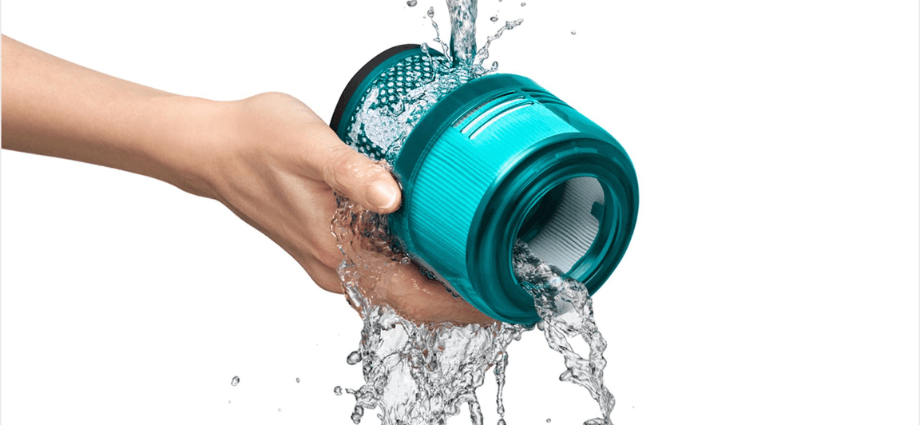
Cleaning your Dyson vacuum filter is a simple yet essential task. By following a few easy steps, you can ensure that your vacuum keeps working as efficiently as possible. Below is a detailed guide to cleaning your Dyson filter.
Preparing for the Cleaning Process
Before starting the cleaning process, make sure to unplug the vacuum and gather the necessary tools:
- Cold water: Do not use hot water, as it can damage the filter.
- A clean space: Clean and dry the area where you will rinse and dry the filter.
- Time: Give yourself time to allow the filter to dry completely (at least 24 hours).
Step-by-Step Guide to Cleaning Dyson Filters
Here’s how to clean your Dyson vacuum filter:
- Remove the filter: Locate the filter in your vacuum and remove it. It is usually located near the cyclone or the top of the machine.
- Rinse under cold water: Hold the filter under cold running water. Gently shake it to remove any trapped dirt and dust.
- Let it dry: After rinsing, allow the filter to dry completely. Make sure it’s fully dry before reinserting it into the vacuum.
Common Mistakes to Avoid When Cleaning Filters
Here are a few common mistakes to avoid while cleaning your Dyson filter:
- Using soap: Soap can damage the filter material and reduce its efficiency.
- Using hot water: Hot water can cause the filter to lose its shape and effectiveness.
- Not letting it dry: A damp filter can lead to mold growth and unpleasant odors.
When to Replace Your Dyson Vacuum Filter
Even with regular cleaning, filters eventually wear out and need replacing. Knowing when to replace your filter is crucial to maintaining your vacuum’s performance. In this section, we’ll cover how often to replace your Dyson vacuum filter and how to choose the right replacement.
How Often Should You Replace the Filter?
Generally, Dyson recommends replacing your vacuum filter every 6-12 months, depending on usage. If you vacuum frequently or have pets, you might need to replace it sooner. Pay attention to changes in performance, like a decrease in suction or an unpleasant odor, as these could indicate that it’s time for a replacement.
Choosing the Right Replacement Filter for Your Dyson
Dyson vacuums come in different models, so it’s important to choose the correct filter for your specific vacuum. Check your model number (usually found on the body of the vacuum) and order a filter designed for that model. Always opt for genuine Dyson filters to ensure optimal performance and compatibility.
Benefits of Proper Dyson Vacuum Filter Maintenance
Maintaining your Dyson vacuum filter isn’t just about cleanliness; it also brings several important benefits. From improved performance to saving money, regular filter maintenance can make a big difference in how your vacuum operates.

Improved Vacuum Performance
A clean filter helps maintain strong suction power. When filters are clogged, your vacuum has to work harder, leading to reduced efficiency. Regular cleaning and replacement ensure that your Dyson vacuum continues to perform at its best.
Longer Vacuum Lifespan
By maintaining clean filters, you can extend the lifespan of your Dyson vacuum. A clean filter reduces strain on the motor, preventing overheating and helping your vacuum last longer.
Cost Savings in the Long Run
Replacing the filter as needed can save you money in the long term. Proper filter maintenance reduces the risk of more expensive repairs, such as motor damage, which can occur when filters are clogged.
Troubleshooting Common Dyson Filter Issues
Even with regular maintenance, you may face issues related to your Dyson vacuum filter. Here, we’ll help you troubleshoot some common problems.
Dealing with Persistent Smells After Cleaning
If your vacuum still smells after cleaning the filter, it could be due to mold or mildew buildup. Try cleaning the filter more thoroughly or placing it in direct sunlight to dry it out completely. If the smell persists, it might be time to replace the filter.
Low Suction Despite Clean Filters
If your Dyson vacuum still has low suction after cleaning the filter, check for other blockages in the vacuum hose or cyclone. A dirty cyclone can reduce suction power, even with a clean filter. Clean all components regularly to ensure optimal performance.
Conclusion
Keeping your Dyson vacuum filter clean and replacing it when necessary is a simple yet essential part of vacuum maintenance. Regular maintenance ensures optimal performance, a longer lifespan, and better air quality in your home. By following the steps in this guide, you can easily keep your vacuum running smoothly and save money on repairs. Make filter cleaning and replacement a routine part of your vacuum upkeep, and your Dyson vacuum will continue to deliver the powerful suction you rely on. Always remember to take care of your vacuum, and it will take care of your cleaning needs.
Share this content:
