Enhancing Your Video Calls: Tips and Tools
Video calls have become an essential part of our daily lives, whether for work, education, or staying in touch with family and friends. However, poor video call quality, technical issues, and lack of etiquette can easily derail the experience. In this article, we will explore practical tips and tools that can help you enhance your video calls and ensure smooth, professional, and productive interactions.

Why Video Call Quality Matters
In both personal and professional settings, video calls are often the primary method of communication. Clear communication and good quality video and audio are crucial for avoiding misunderstandings and building stronger connections.
The Impact of Clear Communication
Clear video and audio are vital for effective communication. Poor video quality can make it difficult for participants to see facial expressions, while poor audio can lead to missed words, making conversations frustrating. Whether it’s a business presentation or a virtual meeting with friends, high-quality video and sound make interactions more enjoyable and productive.
Building a Professional Image
For professional meetings, video call quality plays a significant role in how you present yourself. A clear, crisp image and smooth audio show that you are prepared and invested in the meeting. On the other hand, blurry video or choppy sound can create a negative impression, especially during virtual interviews or client meetings.
Creating a Comfortable Experience for Participants
When video calls run smoothly without technical glitches, participants can focus entirely on the content of the discussion. This helps to engage everyone and encourages active participation. By reducing common issues like audio lag or pixelated video, you contribute to a more comfortable and productive meeting environment.
Essential Tips to Improve Video Call Quality
Now that we understand the importance of good video call quality, here are some essential tips to optimize your calls.
Optimize Your Internet Connection
A stable internet connection is the backbone of any video call. Slow or unstable connections often cause video lags, audio cutouts, and disconnections. To avoid these issues:
- Use a wired connection for stability.
- Position your router to avoid interference.
- Upgrade your internet plan if necessary.
A strong connection ensures your call runs smoothly without interruptions.
Use High-Quality Video and Audio Equipment
Your camera and microphone quality significantly affect the call experience. Investing in a high-quality webcam and microphone can greatly improve the clarity of your video and sound.
- Use an external microphone for clearer audio.
- Choose a high-definition camera for better video.
- Consider using noise-canceling headphones to minimize distractions.
Upgrading to quality equipment ensures a crisp, clear experience for everyone.
Improve Lighting and Background
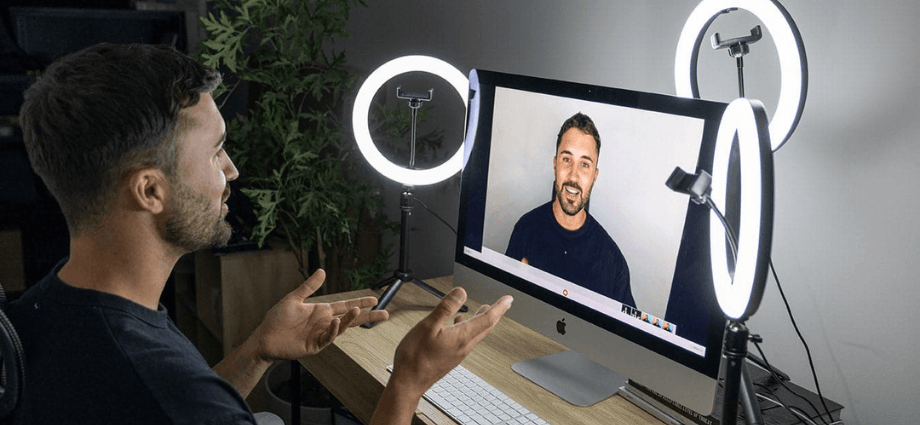
Good lighting is essential for visible and professional video calls. Poor lighting can leave you in the dark, creating a negative impression. Here are some tips:
- Position yourself in front of a natural light source or use soft, diffused lighting.
- Avoid backlighting by sitting with a bright window behind you.
- Use a clean background to avoid distractions.
Proper lighting and a clean background not only improve video quality but also enhance your professional appearance.
Video Call Etiquette and Best Practices
Video call etiquette is just as important as technical quality. Here are some best practices to ensure a smooth and professional experience.
Be Mindful of Your Surroundings
A quiet, organized environment is crucial for a successful video call. Ensure you are in a space free from distractions, noise, or interruptions.
- Choose a quiet room for meetings to minimize background noise.
- Mute yourself when not speaking to avoid interruptions.
A calm and organized environment helps you and other participants stay focused on the discussion.
Dress Appropriately
Dressing professionally, even for a video call, shows respect for your colleagues or clients.
- Dress according to the meeting type.
- Avoid bright colors or distracting patterns that can interfere with the video quality.
Appropriate attire ensures you present yourself as professional and prepared.
Mute When Not Speaking
Background noise is one of the most common distractions during video calls. To maintain a clear conversation, always mute your microphone when you’re not speaking.
- Mute your mic when you’re not talking to prevent background noise from disrupting the conversation.
- Unmute yourself only when it’s your turn to speak.
Being mindful of your audio can improve the overall experience for everyone on the call.
Tools and Software for Enhancing Video Calls
To ensure high-quality video calls, the right software and tools are essential. Here are some tools that can enhance your experience.
Video Conferencing Platforms
Several video conferencing platforms offer different features to enhance your video call experience. Popular tools like Zoom, Google Meet, and Microsoft Teams all come with advanced features such as screen sharing, HD video, and virtual backgrounds.
- Zoom offers excellent video quality, breakout rooms, and integration with other productivity tools.
- Google Meet offers simplicity and ease of use for teams already using Google Workspace.
Choosing the right platform with the features that suit your needs is key to a successful call.
Virtual Backgrounds and Filters
Virtual backgrounds are a great way to maintain professionalism during video calls. They allow you to hide your personal space and create a clean environment.
- Choose a professional background for work calls, such as an office or neutral setting.
- Be cautious with fun backgrounds as they can be distracting in more formal meetings.
Virtual backgrounds help maintain focus and improve the overall aesthetic of your call.
Collaboration Tools and Add-ons
For business meetings or group calls, using collaboration tools can help improve productivity. Platforms like Miro, Trello, and Google Docs allow participants to collaborate in real time.
- Use screen sharing to present documents, slides, or other media.
- Leverage collaborative documents for live note-taking or brainstorming.
These tools enable real-time collaboration and make your video calls more interactive and productive.
Overcoming Common Video Call Challenges
Even with the right tools and tips, challenges may arise during video calls. Here’s how to overcome common issues.
Addressing Audio and Video Lag
Lag can be caused by an unstable internet connection or overloaded hardware. To resolve this:
- Check your internet speed and make sure it meets the requirements for video calls.
- Close unnecessary apps to free up system resources.
By troubleshooting your connection and settings, you can reduce lag and improve call quality.
Preventing Call Interruptions
Interruptions can derail a video call. To minimize disruptions, inform your household or colleagues about your meeting time and set up a “Do Not Disturb” mode on your devices.
- Mute notifications during calls to avoid distractions.
A bit of preparation can ensure a seamless, interruption-free call.
Conclusion
Enhancing your video call experience requires attention to detail, the right tools, and good etiquette. By optimizing your internet connection, investing in quality equipment, improving lighting and background, and following video call etiquette, you can ensure that your video calls are productive, professional, and enjoyable. With these tips and tools, you’ll be able to communicate clearly and confidently in all your virtual interactions.
Share this content:
