Keeping Your iRobot Roomba Clean for Optimal Performance
Maintaining your iRobot Roomba is essential for ensuring it performs at its best. Regular cleaning and maintenance routines help extend its lifespan and improve efficiency. This article will guide you through daily, weekly, monthly, and seasonal cleaning routines to keep your Roomba in optimal condition.

Daily Cleaning Routine
A short daily cleaning routine will keep your Roomba running smoothly and efficiently. Performing these simple tasks every day ensures your Roomba can clean effectively without any interruptions.
Emptying the Dustbin
Regularly emptying the dustbin is crucial for preventing blockages and maintaining suction power.
- Open the dustbin compartment located at the back or side of your Roomba.
- Dispose of the collected debris into a trash bin.
- Gently tap the dustbin to remove any remaining dust particles.
- Reinsert the dustbin securely back into the Roomba.
Emptying the dustbin daily ensures that your Roomba doesn’t get clogged and can continue to pick up dirt and debris efficiently.
Cleaning the Brushes
Daily cleaning of the main and side brushes ensures they pick up dirt effectively. Remove the main brush by lifting it out of its compartment. Use a cleaning tool or your fingers to clear any tangled hair, string, or debris from the brush. Detach the side brush using a screwdriver if necessary and clean it similarly. Reattach the brushes securely back into their compartments. Clean brushes are essential for effective cleaning, as they help lift dirt and debris from various surfaces.
Checking for Obstructions
Checking for obstructions ensures your Roomba can move freely and efficiently around your home.
- Inspect the wheels for any debris that may be caught in them.
- Look for any objects or debris in the cleaning path that might impede the Roomba’s movement.
- Remove any visible obstacles, such as cords, small toys, or large debris.
By ensuring the cleaning path is clear, your Roomba can navigate your home without getting stuck or missing areas.
Weekly Maintenance
Weekly maintenance helps to keep your Roomba in top condition. These tasks are more thorough than daily routines and help address any buildup of dirt and debris.
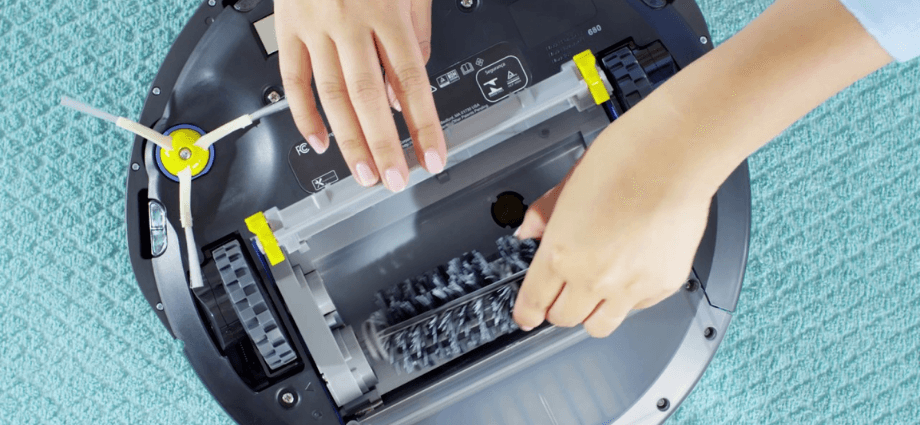
Performing these tasks weekly will ensure optimal performance of your Roomba.
Deep Cleaning the Brushes
A deeper clean of the brushes removes hair and debris that might be tangled and affect performance. Detach the main brush and side brushes from their compartments. Use a brush cleaning tool to remove stubborn debris and tangled hair from the brushes. Clean the brush compartments, removing any dirt or dust that has accumulated. Reassemble the brushes and ensure they are securely attached. Regular deep cleaning of the brushes ensures they remain effective in picking up dirt and debris from your floors.
Filter Maintenance
Maintaining the filter is essential for keeping the air clean and maintaining performance.
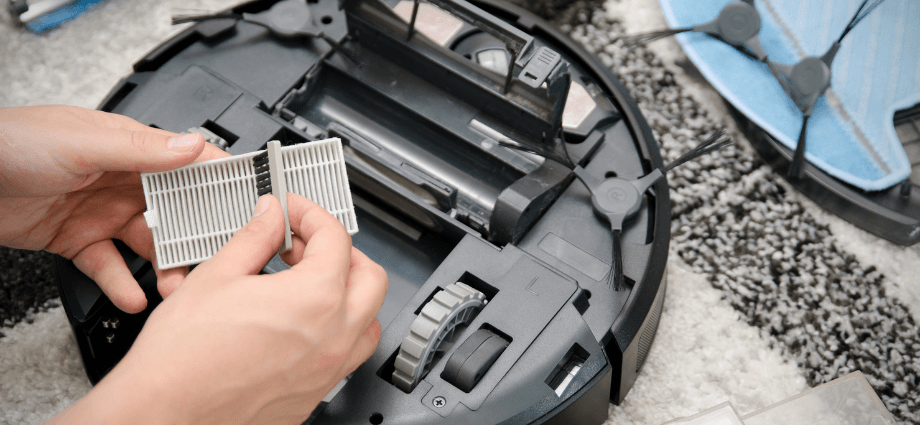
- Remove the filter from its compartment.
- Tap the filter gently to remove dust and debris.
- If the filter is washable, rinse it under running water and let it air dry completely before reinserting.
- Replace the filter with a new one if it is damaged or excessively dirty.
Clean filters help maintain the Roomba’s suction power and ensure that the air expelled is free of dust and allergens.
Wiping Down Sensors
Cleaning the sensors ensures your Roomba can navigate and clean effectively. Use a soft cloth to gently wipe each sensor, removing any dust or dirt. Avoid using water or harsh chemicals on the sensors to prevent damage. Check all the sensors to ensure they are clean and unobstructed. Clean sensors are crucial for the Roomba’s navigation system, allowing it to detect obstacles and clean efficiently.
Monthly Maintenance
Monthly checks help to identify potential issues early and maintain the overall performance of your Roomba.
Perform these tasks monthly to catch any potential issues early and maintain efficiency.
Inspecting the Wheels
Checking the wheels for wear and tear is crucial for smooth operation and mobility.
- Examine the wheels for any signs of damage, such as cracks or excessive wear.
- Clean any debris from the wheel wells using a soft brush or cloth.
- Lubricate the wheels if necessary to ensure smooth movement.
- Replace damaged wheels if needed to maintain optimal performance.
Regular inspection and maintenance of the wheels ensure that your Roomba can move freely and clean effectively.
Battery Care
Maintaining the battery is essential for long-term use and efficiency. Fully charge the battery after each use to ensure it is ready for the next cleaning session. Avoid overcharging the battery, as this can reduce its lifespan. Store the Roomba and its battery in a cool, dry place when not in use. Follow the manufacturer’s guidelines for battery maintenance and replacement. Proper battery care ensures that your Roomba remains powered and efficient for longer periods.
Software Updates
Keeping the software up-to-date ensures your Roomba functions optimally and benefits from the latest features and improvements.
- Check for software updates regularly via the Roomba app.
- Follow the instructions provided in the app to install updates.
- Restart the Roomba after updating to ensure the new software is properly integrated.
Software updates often include performance enhancements and bug fixes, helping your Roomba run more efficiently.
Seasonal Maintenance
Seasonal maintenance involves more thorough checks and replacements, ensuring your Roomba remains in excellent condition throughout the year.
Every season, perform these tasks to ensure your Roomba remains in excellent condition.
Replacing Brushes and Filters
Replacing the brushes and filters regularly keeps your Roomba in top condition and ensures effective cleaning. Purchase replacement parts from the manufacturer or authorized retailers. Follow the instructions provided with the replacement parts to install them correctly. Dispose of old brushes and filters properly, following local disposal guidelines. Regular replacement of brushes and filters helps maintain the Roomba’s cleaning efficiency and prolongs its lifespan.
Checking for Software Updates
Seasonally checking for software updates ensures your Roomba stays current and benefits from the latest improvements. Open the Roomba app on your smartphone or tablet. Navigate to the update section within the app. Check for any available software updates and install them as needed. Regularly updating the software helps keep your Roomba running smoothly and efficiently, with access to the latest features.
General Inspection
A thorough inspection helps catch any issues before they become serious, ensuring your Roomba continues to perform optimally.
- Inspect the entire unit for any signs of wear, damage, or loose parts.
- Tighten or replace any loose or damaged components as needed.
- Check the charging contacts and clean them if necessary to ensure proper charging.
Performing a general inspection every season helps identify and address potential issues before they affect the Roomba’s performance.
Conclusion
Regular maintenance of your iRobot Roomba is essential for optimal performance and longevity. By following these daily, weekly, monthly, and seasonal routines, you ensure your Roomba operates efficiently and lasts longer. Consistent upkeep will keep your home clean and your device in top shape.
Share this content:
