Tips to Keep Your KitchenAid Stand Mixer in Top Condition
A KitchenAid stand mixer is a kitchen workhorse, helping you prepare everything from dough to whipped cream with ease. To ensure it works flawlessly for years, regular maintenance is crucial. By following some simple tips, you can keep your stand mixer in top condition, avoiding unnecessary repairs and extending its lifespan. In this article, we’ll share essential steps to maintain your mixer for long-lasting performance.
Regular Cleaning and Maintenance
Keeping your KitchenAid stand mixer clean is one of the easiest ways to ensure it functions properly over time. Regular cleaning helps avoid build-up of food residue, grease, and grime, which can cause performance issues.

Clean After Every Use
Every time you use your stand mixer, it’s essential to clean it properly to prevent any food residue from sticking or causing build-up.
- Wipe down the mixer’s body and motor head with a damp cloth.
- Remove the bowl and attachments and wash them with warm, soapy water.
- Dry the bowl and attachments thoroughly before reattaching them.
A quick wipe-down after each use can make a big difference, ensuring your mixer stays clean and hygienic for future use.
Deep Cleaning Routine
While daily cleaning is important, giving your stand mixer a more thorough cleaning every so often can help keep it in top shape.
Unplug the mixer before cleaning to avoid accidents. Clean the motor hub and any crevices where dust or food might gather. Use a soft brush or cotton swabs to reach hard-to-reach areas like around the attachment ports. Use a mild, non-abrasive cleaner to prevent scratching the surface.
Performing this deeper clean regularly ensures that no food particles remain in the motor and attachments, reducing wear and keeping the machine in good condition.
Proper Storage Practices
Proper storage is crucial to ensuring your KitchenAid stand mixer remains in great working order. Storing it properly prevents damage and keeps it free from dust or moisture.
Store in a Dry Place
Moisture is one of the most harmful elements to a stand mixer. Storing it in a dry, cool area helps prevent rusting or electrical issues caused by exposure to moisture.
Avoid storing your mixer in a damp or humid environment like a basement or near the sink. If possible, store it in a cabinet or cupboard to protect it from dust and moisture. When storing, make sure the mixer is unplugged to prevent electrical issues.
Keeping your mixer away from moisture ensures that the metal parts don’t corrode, extending the lifespan of your appliance.
Use the Stand for Stability
When not in use, ensure that your mixer is stored on a stable surface to avoid accidental falls or tipping. Proper placement will help prevent damage to the appliance.
- Place the mixer on a sturdy counter or shelf.
- Make sure the area around the mixer is clear of clutter to prevent accidental knocks.
- Always place it with the motor head facing upwards to avoid any pressure on the attachments.
Storing the mixer in a safe, stable spot helps prevent accidents that could damage your KitchenAid stand mixer.
Regular Check-ups and Inspections
A little bit of preventive care goes a long way in maintaining your KitchenAid stand mixer. Regularly checking for wear and tear will help you identify any potential issues early on.

Inspect for Loose Parts
Periodically checking your mixer for any loose parts can help avoid bigger problems down the road. Loose screws or attachments can lead to improper functioning and even cause damage to the motor.
- Check the screw on the mixer’s body and attachments for tightness.
- Ensure the stand mixer bowl is securely locked into place.
- Inspect the beaters, dough hook, and other attachments for any signs of damage.
By catching loose parts early, you can fix them before they become bigger problems.
Listen for Unusual Sounds
The sound of your KitchenAid stand mixer can tell you a lot about its condition. Strange or unusual noises might indicate an issue with the motor or gears.
If the mixer starts making grinding, clunking, or high-pitched noises, stop using it. Pay attention to any irregular sounds during heavy mixing or kneading. If the noises persist, have a professional inspect your stand mixer.
Listening for unusual sounds and addressing them promptly can prevent damage and ensure your stand mixer is running smoothly.
Avoiding Overuse and Overloading
Your KitchenAid stand mixer is built to handle a lot, but overuse or overloading can damage the motor. Understanding its limits is key to ensuring long-term functionality.
Know Your Mixer’s Limits
Every KitchenAid stand mixer has a certain capacity. Exceeding this capacity could strain the motor and cause it to wear out faster.
Always refer to the user manual for guidelines on the maximum mixing or kneading capacity. Avoid using the mixer for tasks that are too heavy for its motor, such as mixing thick dough beyond its limit. Don’t attempt to overmix, as this can overheat the motor.
Understanding your mixer’s limits will help prevent unnecessary stress on the motor and ensure it continues to perform well.
Take Breaks During Heavy Use
If you’re mixing or kneading for long periods, it’s important to give the mixer breaks to prevent overheating.
- Turn off the mixer after 10-15 minutes of continuous use.
- Allow it to cool down for a few minutes before resuming.
- If you need to mix for longer periods, consider using the mixer in stages.
Taking regular breaks during heavy use will give the motor a chance to cool down and prevent any damage caused by prolonged strain.
Using the Right Attachments
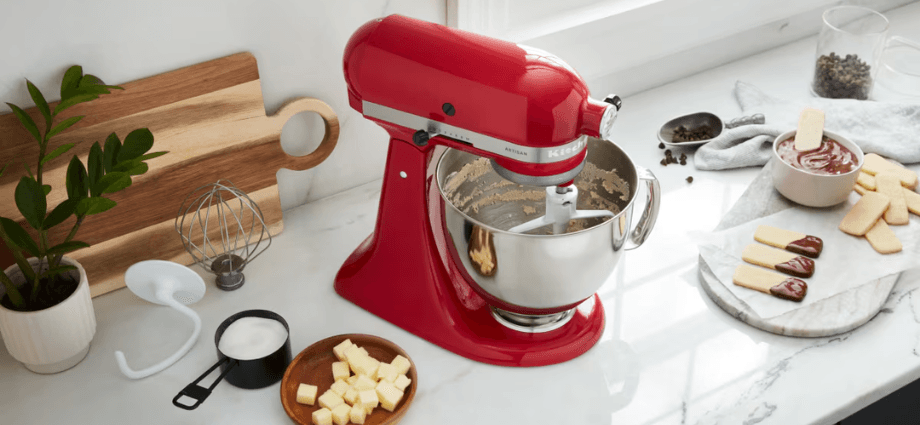
Using the right attachments and accessories for your KitchenAid stand mixer not only enhances its performance but also protects it from damage. The wrong attachments can place too much strain on the motor and affect the efficiency of the machine.
Choose High-Quality Attachments
While it might be tempting to buy cheaper, non-KitchenAid accessories, doing so can harm your stand mixer over time.
Always use attachments that are specifically designed for your KitchenAid model. High-quality attachments ensure that the motor doesn’t get overstressed. Avoid generic attachments that may not fit properly or could cause malfunction.
Using the correct, high-quality attachments keeps your stand mixer running smoothly and reduces the risk of motor damage.
Clean Attachments Properly
It’s just as important to clean your attachments as it is to clean the mixer itself. Well-maintained attachments will work better and last longer.
- Wash attachments like the dough hook and whisk thoroughly after each use.
- Dry them completely to avoid rust or buildup of food particles.
- Periodically check the attachments for any cracks or signs of wear.
By properly cleaning and maintaining your attachments, you ensure that your KitchenAid stand mixer performs at its best.
Conclusion
Maintaining your KitchenAid stand mixer is key to ensuring it continues to serve you well for years. By following the simple tips in this guide, from regular cleaning to proper storage, you’ll keep your mixer in excellent condition. Routine checks and using the right attachments will help prevent issues before they arise. Invest in regular care, and your mixer will reward you with lasting performance.
Share this content:
