Philips Sonicare Toothbrush Care and Maintenance Tips
A healthy smile starts with good oral hygiene, and the right tools can make all the difference. Philips Sonicare toothbrushes are known for their advanced features that help provide a superior clean, making them a popular choice for many. However, like any high-tech device, ensuring that your Philips Sonicare toothbrush remains in optimal condition requires regular care and maintenance. In this article, we’ll provide you with easy-to-follow tips to keep your toothbrush functioning at its best, extending its life and making sure it continues to support your oral hygiene routine effectively.
Why Proper Care Matters
Proper care is essential for ensuring that your Philips Sonicare toothbrush stays efficient and works well over time. Regular maintenance will not only help your toothbrush perform at its best but also ensure it lasts longer.
Benefits of Maintaining Your Philips Sonicare Toothbrush
Taking care of your toothbrush is not just about keeping it clean; it’s about preserving the power and effectiveness of the device. Here’s why proper maintenance matters:
- Prevents Wear and Tear: Regular cleaning and proper handling of the brush head, motor, and charging components prevent excessive wear, which could shorten the lifespan of your toothbrush. Keeping it clean also helps prevent plaque buildup that could interfere with performance.
- Ensures Optimal Performance: A well-maintained toothbrush will perform at its peak, ensuring that each brushing session is as effective as possible. Keeping the motor clean and free from buildup means the toothbrush will be able to deliver consistent power, maintaining its cleaning capabilities.
- Enhances Battery Life: Battery maintenance is essential for longevity. By following proper charging habits, you can extend the life of the battery and avoid needing to replace it too soon. Overcharging or incorrect storage can shorten battery life, reducing your toothbrush’s performance over time.
Proper maintenance means not only a toothbrush that works effectively but one that will last longer, saving you money on replacements.
Daily Cleaning Tips
Daily cleaning is one of the most essential habits to keep your Philips Sonicare toothbrush in great condition. A few simple steps every day can go a long way in preventing buildup and maintaining the performance of your device.
How to Clean Your Philips Sonicare Toothbrush Daily
Daily care for your toothbrush doesn’t take much time and helps keep everything in good working order. Incorporating these simple steps into your routine will ensure a cleaner toothbrush and a healthier mouth.
After every use, rinse the brush head thoroughly under warm water to remove any leftover toothpaste and plaque. This will prevent any residue from hardening and affecting the bristles’ effectiveness.
Wipe down the handle and charging base with a damp cloth to remove dust, toothpaste stains, and any moisture. Keeping these areas clean ensures that you avoid any water buildup, which can lead to corrosion or electrical issues over time.
Once you’re done with the cleaning process, be sure to let the brush head air dry. Allowing it to dry completely before putting it back in its case or on the charging station will help reduce moisture buildup, preventing bacteria or mold from developing.
These simple steps take just a couple of minutes but are incredibly important for keeping your toothbrush hygienic and functional.
Weekly and Monthly Maintenance
While daily cleaning is essential, weekly and monthly maintenance tasks ensure that your toothbrush stays in top condition for the long term. These are tasks you can do on a less frequent basis to keep your Philips Sonicare toothbrush performing like new.
Maintenance Tips for Longer-Term Care
To keep your toothbrush running at its best, a few additional steps should be taken once a week or month.
- Replace the Brush Head Regularly: It’s important to replace the brush head every 3 months or when you notice that the bristles have started to fray. Frayed bristles lose their effectiveness, meaning your toothbrush won’t clean your teeth as efficiently. Replacing the head regularly ensures that you continue to get the best cleaning results.
- Sanitize the Brush Head and Handle: Sanitizing the brush head and handle weekly helps keep germs and bacteria at bay. Use alcohol wipes or a mild disinfectant solution to clean the surface of both. This simple practice helps maintain cleanliness and hygiene, particularly since the toothbrush is used inside the mouth.
- Clean the Charging Base: Over time, dust, toothpaste, and other particles can accumulate on your charging base. Clean the base regularly to ensure that there’s no buildup on the charging contacts. Keeping the charging station free from grime helps maintain the electrical connection and charging performance.
Adding these tasks into your weekly or monthly routine helps to preserve the effectiveness and functionality of your toothbrush while maintaining a high standard of cleanliness.
Battery Care and Charging Tips
One of the most common issues with electric toothbrushes is related to the battery. Proper battery care is essential to prolong its life and ensure that your Philips Sonicare toothbrush works efficiently for a long time.
How to Properly Care for the Philips Sonicare Toothbrush Battery
Taking care of your toothbrush battery is just as important as maintaining the brush head. Proper charging habits and battery maintenance can significantly extend the life of your toothbrush.
Avoid overcharging the toothbrush. Many people tend to leave their toothbrush plugged in once it’s fully charged, but overcharging can negatively affect the battery’s lifespan. Try to remove the toothbrush from the charging station once it’s fully charged or simply charge it overnight without worry.
When charging, place your toothbrush on its charging base only when the battery is low. If you need to store the toothbrush for an extended period, try to leave it with around 50% charge. This helps protect the battery and ensures it will function optimally when you use it again.
If you notice that the toothbrush isn’t holding a charge or the battery seems to drain quickly, it may be time to replace the battery. Contact Philips for replacement options or consult the user manual for guidance on how to resolve any battery-related issues.
Troubleshooting and Common Issues
Even with regular care, your Philips Sonicare toothbrush might face some issues from time to time. Knowing how to troubleshoot common problems can save you time and prevent unnecessary frustration.
What to Do When Your Philips Sonicare Stops Working
Occasionally, you may experience issues with your toothbrush. Here’s how to address some of the most common problems:
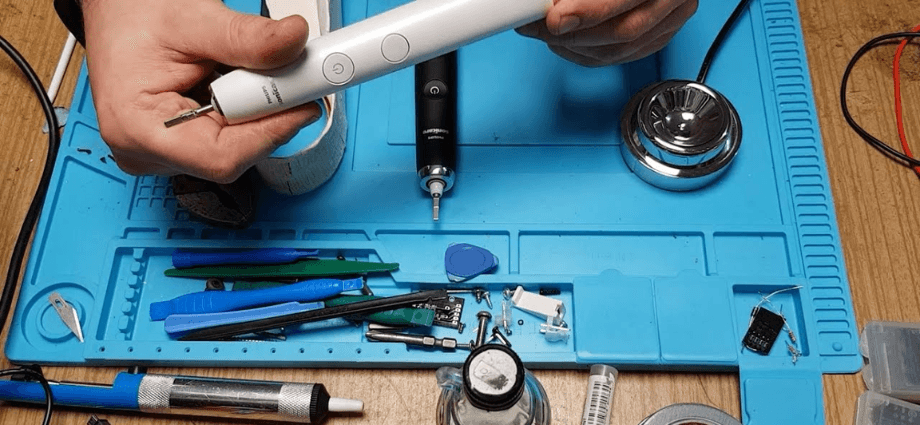
If the brush head stops moving, check for dirt or debris that might be obstructing the motor. Clean both the brush head and the motor area thoroughly to ensure smooth operation. If the problem persists, consider replacing the brush head.
Charging problems are another common issue. Ensure the charging contacts on both the toothbrush and the charging base are clean and free from any debris. If the toothbrush still isn’t charging properly, try plugging it into a different power source or reset the charging station.
If you notice unusual sounds or vibrations while using the toothbrush, this could indicate a mechanical issue with the motor or the brush head. Inspect the brush head for any signs of damage or wear. If necessary, replace it to avoid any performance issues.
Knowing how to troubleshoot these common issues can help you maintain a seamless experience with your toothbrush.
Conclusion
By following these Philips Sonicare toothbrush care and maintenance tips, you’ll keep your device working effectively and continue to enjoy a healthier smile. With regular cleaning, battery maintenance, and brush head replacement, you ensure a longer lifespan for your toothbrush and better oral health overall.
Share this content:
