Tips for Extending Your Smartphone’s Battery Life
A smartphone’s battery life can greatly impact its usability and your day-to-day convenience. Whether you’re using your phone for work, entertainment, or staying connected, conserving battery life ensures your device is ready when you need it. Here’s a comprehensive guide to extending your smartphone’s battery life through optimization, habits, and hardware care.
Optimize Smartphone Settings
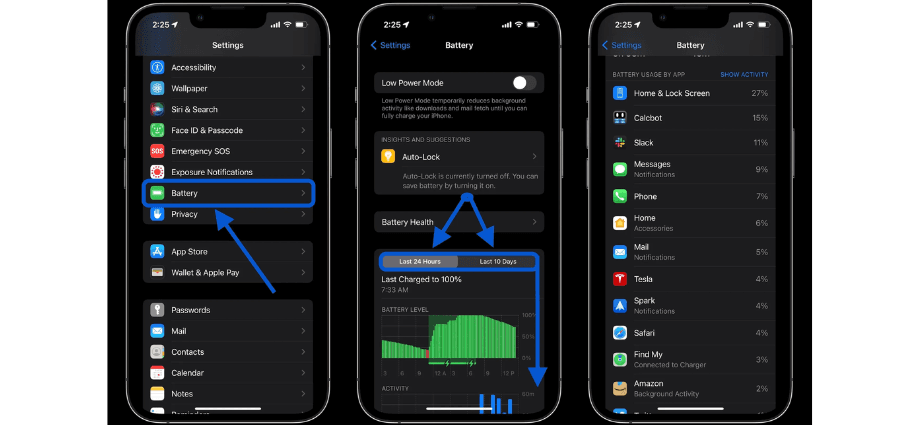
Your phone’s settings play a significant role in determining how quickly its battery drains. By adjusting these features, you can maximize battery efficiency without sacrificing functionality.
Brightness and Display Settings
The display is one of the most power-hungry components of a smartphone. Reducing its energy consumption can make a noticeable difference.
- Lower the screen brightness or enable auto-brightness to adjust brightness levels automatically based on ambient light.
- Reduce the screen timeout duration so the display turns off quickly when not in use.
- Activate dark mode if your phone has an OLED screen, as it uses less power to display black pixels.
These changes are simple yet effective ways to extend battery life during daily use.
App and Notification Management
Background activity from apps and constant notifications can drain your battery. Managing them effectively reduces power consumption.
- Limit background app refresh for apps that don’t need to run continuously.
- Turn off push notifications for non-essential apps to avoid unnecessary wake-ups.
- Uninstall or disable apps that consume excessive battery power.
Proper app management not only saves battery but also keeps your phone running smoothly.
Connectivity Settings
Wireless features like Wi-Fi, Bluetooth, and GPS are convenient but can be significant battery drains if left on unnecessarily.
- Turn off Wi-Fi, Bluetooth, and GPS when not in use.
- Use airplane mode in areas with poor signal to prevent your phone from searching for a network.
- Disable mobile data when you don’t need it to minimize background activity.
These simple adjustments can make your battery last longer throughout the day.
Adjust Usage Habits
How you use your smartphone has a direct impact on its battery life. Making small changes to your habits can yield significant benefits.
Manage Charging Habits
Proper charging practices can extend your battery’s lifespan and performance over time.
- Avoid overcharging or letting the battery drain completely; aim to charge between 20% and 80%.
- Use chargers and cables recommended by your phone’s manufacturer.
- Remove your phone from the charger once it’s fully charged to prevent overheating.
By adopting these habits, you’ll help preserve your battery’s health and longevity.
Reduce Battery-Intensive Activities
Certain activities consume more power than others. Reducing their frequency can help extend battery life.
- Limit gaming and streaming on mobile data, as they are particularly battery-intensive.
- Close apps after use instead of leaving them running in the background.
- Minimize multitasking, especially on older devices, to avoid unnecessary strain.
Using your phone more efficiently can result in a noticeable improvement in battery life.
Use Power-Saving Features
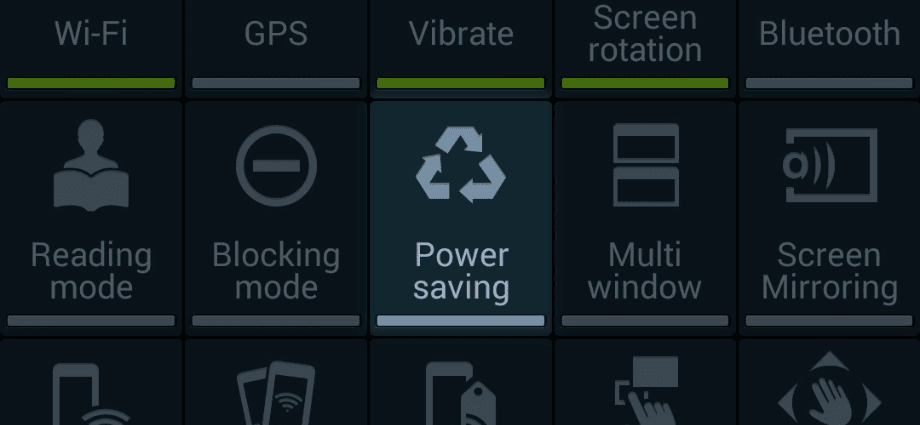
Modern smartphones come with built-in features designed to conserve power during low-battery situations.
- Enable battery saver mode to limit background processes and lower performance demands.
- Activate adaptive battery settings, which prioritize power for frequently used apps.
- Switch to low-power mode during extended outings or travel to conserve energy.
These features are especially useful when you’re unable to recharge your phone.
Maintain Hardware Health
Taking care of your smartphone’s hardware ensures that the battery performs optimally over time. Neglecting hardware can lead to faster degradation and reduced efficiency.
Protect Against Overheating
High temperatures can damage your battery and shorten its lifespan. Keeping your phone cool is essential for maintaining battery health.
- Avoid exposing your phone to direct sunlight or hot environments for extended periods.
- Refrain from using your phone while charging for prolonged durations.
- Ensure proper ventilation when using your phone during demanding tasks.
These precautions help prevent overheating and maintain consistent battery performance.
Keep Software Up to Date
Software updates often include battery optimization fixes and performance improvements.
- Install the latest software updates for your phone’s operating system.
- Remove outdated apps that may drain resources unnecessarily.
- Clear cache files regularly to reduce background processes.
Updating software ensures your phone operates efficiently and consumes less power.
Replace Aging Batteries
All smartphone batteries degrade over time, but recognizing the signs of wear can help you address the issue promptly.
- Look for symptoms like rapid battery drain, swelling, or failure to hold a charge.
- Visit authorized service centers for battery replacement to ensure quality and safety.
- Avoid aftermarket batteries that may compromise your phone’s performance or safety.
Replacing an old battery can restore your phone’s usability and extend its lifespan.
Leverage External Solutions
Using external tools and accessories can help keep your smartphone charged and ready for use, especially when you’re on the go.
Portable Chargers and Power Banks
Portable chargers are lifesavers during long trips or power outages.
- Choose a power bank with sufficient capacity to fully charge your device.
- Opt for lightweight designs that are easy to carry around.
- Keep a portable charger on hand for emergencies.
These accessories ensure you’re never without power when you need it most.
Battery Cases
Battery cases combine protection with additional power for your phone.
- Invest in a battery case compatible with your phone model.
- Look for cases that balance durability and functionality.
- Use them during travel or busy days when charging opportunities are limited.
Battery cases are convenient for extending usage without carrying extra accessories.
Wireless Charging Options
Wireless chargers are a convenient option for keeping your phone powered, but they come with trade-offs.
- Use certified chargers to ensure safe and efficient charging.
- Avoid prolonged wireless charging sessions to prevent overheating.
- Understand that wireless charging may be slower than wired alternatives.
When used appropriately, wireless chargers add convenience to your daily routine.
Common Myths About Battery Life
Misconceptions about battery care can lead to poor practices. Understanding the facts helps you make better decisions for your device.
Closing Apps Saves Power
Many users believe force-closing apps improves battery life, but this is not always true.
- Force-closing apps can increase battery usage when they restart.
- Limit background processes only for apps that drain resources.
- Use built-in app optimization tools instead of manual intervention.
Knowing when to close apps helps you conserve power effectively.
Charging Overnight Damages the Battery
Modern smartphones have features to prevent overcharging.
- Battery management systems stop charging when the battery reaches 100%.
- Overnight charging is generally safe if you use quality chargers.
- Remove the phone from the charger in high-temperature conditions.
Understanding your phone’s technology prevents unnecessary worries about overnight charging.
Conclusion
Extending your smartphone’s battery life requires a combination of proper settings, mindful habits, and regular maintenance. By optimizing settings, managing usage, and leveraging external tools, you can keep your phone powered and functional throughout the day. Small changes in how you use and care for your device can have a lasting impact on battery performance and longevity.
Share this content:
