Top Laptop Stands for Improved Ergonomics
Laptop stands have become a vital accessory for anyone who uses their laptop for long hours. While laptops are portable and convenient, they are often not designed to promote good posture. Spending long hours hunched over your laptop can lead to neck, back, and wrist pain. That’s where laptop stands come in—by elevating your laptop to eye level, a laptop stand promotes better posture, reduces discomfort, and helps improve your overall ergonomics.
Why Ergonomics Matter for Laptop Use
Ergonomics for laptop use is essential to prevent discomfort and long-term health issues. Proper positioning reduces strain on the neck, back, and wrists, promoting better posture, comfort, and overall well-being during use.
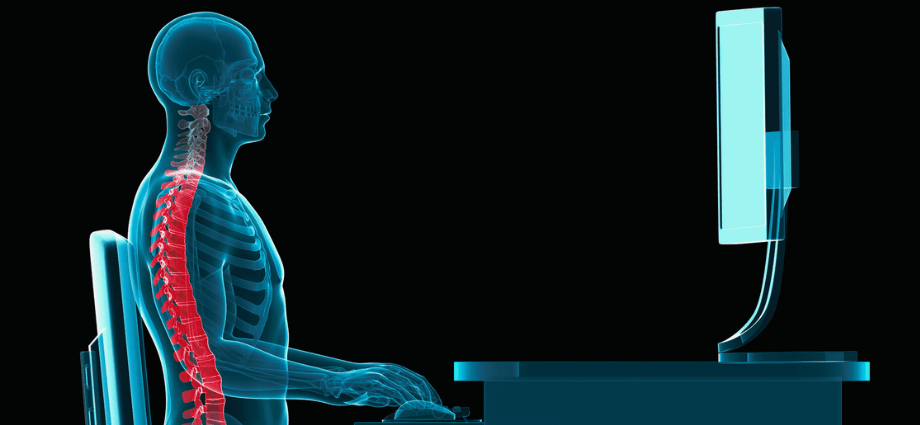
Preventing Neck and Back Strain
Using a laptop on a flat surface often leads to poor posture. If your laptop screen is too low, you tend to lean forward or down, straining your neck and back muscles. Over time, this can lead to chronic pain and discomfort. A laptop stand can help address this problem by raising your laptop to eye level, promoting a natural, upright posture and reducing the risk of strain and injury.
Improved Posture
When your laptop is elevated, it encourages you to sit up straight, rather than slouching or leaning forward. Proper posture helps reduce the chances of developing musculoskeletal issues, such as neck pain, back pain, or even carpal tunnel syndrome. A laptop stand makes it easier to maintain good posture, ensuring that your body is aligned and balanced.
Wrist and Hand Comfort
The angle at which you use your laptop keyboard can also lead to wrist strain. Using a laptop without an ergonomic setup often causes your wrists to bend in awkward positions. When using a laptop stand, you can raise the laptop’s keyboard to a more natural angle, reducing strain on your wrists and hands. This is particularly important for people who type for extended periods.
Key Features to Look for in a Laptop Stand
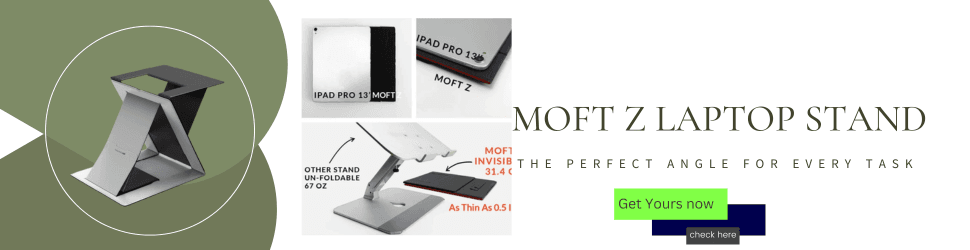
When selecting a laptop stand, there are several features that can significantly enhance your comfort and ergonomics. These include:
Adjustability
A stand with adjustable height and tilt features allows you to customize the position of your laptop according to your comfort level. Being able to change the height ensures that the screen is at eye level, which is key to avoiding neck and back strain. Additionally, adjustable tilt angles help you find the most comfortable viewing position.
Portability and Stability
If you need to move your stand between different locations, look for a portable option that is easy to carry and store. Many laptop stands are lightweight and foldable, making them perfect for remote workers or people who travel. Stability is also crucial, so ensure that the stand you choose can securely hold your laptop without wobbling or slipping.
Material and Build Quality
Sturdy materials like aluminum or steel offer both durability and stability. These materials ensure that the stand can hold your laptop securely, even during intense typing sessions. Additionally, some stands are designed with cooling features, such as ventilation holes or built-in fans, which can help prevent your laptop from overheating during extended use.
Top Laptop Stands for Ergonomics
Now, let’s take a closer look at some of the best laptop stands available on the market, which can significantly improve your comfort and posture:
1. Rain Design mStand
The Rain Design mStand is a favorite among many users for its sleek design and strong functionality. It is made from high-quality aluminum and offers excellent stability and durability.
- Ergonomic Benefits: The mStand raises your laptop to a height that is comfortable for your neck and spine, which helps to reduce the strain caused by slouching.
- Cooling Features: The stand features an open design that allows air to circulate, keeping your laptop cool during long hours of use.
- Stability: It is made from solid aluminum, which provides stability, so your laptop won’t wobble while typing or touching the screen.
2. Roost Laptop Stand
For those who are frequently on the move, the Roost Laptop Stand is an ideal choice. Known for its portability and adjustability, it’s perfect for digital nomads and remote workers.
- Ergonomic Benefits: The stand is highly adjustable, allowing you to find the perfect height for your comfort, no matter where you are working.
- Portability: Weighing only 0.3 pounds, the Roost stand is incredibly light and folds flat, making it easy to carry in a laptop bag.
- Stability: Despite its lightweight design, the Roost stand is very stable and can hold laptops of various sizes securely.
3. Logitech Laptop Stand
Logitech offers a compact and user-friendly laptop stand that is perfect for home or office use. It’s known for its minimalist design and ergonomic features.
- Ergonomic Benefits: The stand’s adjustable height allows you to raise your laptop to eye level, which reduces neck strain.
- Cooling: The open design encourages airflow to prevent your laptop from overheating.
- Compact Design: The stand has a small footprint, making it an excellent choice for those with limited desk space.
4. MOFT Z Laptop Stand
The MOFT Z Laptop Stand is a foldable and highly portable option that stands out due to its innovative design. It’s lightweight, easy to use, and offers several adjustable positions.
- Ergonomic Benefits: The stand offers multiple height settings, allowing you to customize the viewing angle and maintain an ergonomic posture.
- Portability: The MOFT Z is extremely lightweight and folds completely flat, making it ideal for travel.
- Stability: Despite its thin and flexible design, the stand remains stable even when supporting larger laptops.
How to Set Up an Ergonomically Correct Workspace with a Laptop Stand
Using a laptop stand is a crucial step toward improving your ergonomic setup, but it’s not the only factor to consider. Here’s how to ensure that your entire workspace is set up for maximum comfort:
Desk Height and Chair Positioning
Ensure that your desk is the right height so that your elbows rest comfortably at a 90-degree angle while typing. Your chair should provide adequate lumbar support to maintain the natural curve of your spine. Avoid sitting on soft chairs that allow you to slouch.
Proper Laptop Screen Height
Position the top of your laptop screen at or just below eye level. This minimizes the need to lean forward or look down, reducing neck strain. Additionally, keep the screen about 20 to 30 inches from your eyes for optimal viewing.
Keyboard and Mouse Placement
For maximum comfort, use an external keyboard and mouse with your laptop. Position them so that your elbows are close to your body and your wrists are straight. This reduces the risk of developing repetitive strain injuries.
Additional Accessories to Enhance Ergonomics
A laptop stand alone is not enough to create a fully ergonomic setup. To further enhance your comfort, consider adding the following accessories:
External Keyboards and Mice
Using an external keyboard and mouse helps keep your wrists and hands in a more natural, neutral position, minimizing strain. A split keyboard design can provide additional ergonomic benefits, promoting better wrist alignment. Similarly, an ergonomic mouse or a vertical mouse can reduce stress on your hand and wrist, making it easier to work for extended periods.
Wrist Rests
Wrist rests, especially those made from gel or memory foam, offer added support during long typing sessions. They prevent excessive pressure on your wrists, reducing discomfort and the risk of repetitive strain injuries. By keeping your wrists at an optimal angle, these rests ensure a more relaxed posture.
Chairs and Desk Setup
A high-quality ergonomic chair with lumbar support can significantly reduce back pain and improve your overall posture. Look for chairs with adjustable height, armrests, and backrests to suit your specific needs. Pairing your chair with an adjustable desk allows you to alternate between sitting and standing, promoting better circulation and reducing the risks associated with prolonged sitting.
Conclusion
Investing in a laptop stand is an easy and effective way to improve your ergonomics and comfort while working. The top laptop stands we’ve covered—Rain Design mStand, Roost Laptop Stand, Logitech Laptop Stand, and MOFT Z—are all excellent options for raising your laptop to eye level, reducing neck and back strain, and improving your posture. By incorporating a stand into your workspace, along with other ergonomic accessories such as external keyboards and wrist rests, you can create a healthier, more comfortable, and productive work environment.
Share this content:
