Samsung SmartThings: What Can It Do for Your Home?
Samsung SmartThings is a system that unifies different smart home devices under one umbrella, reducing complexity and giving you a convenient way to control gadgets with straightforward commands or simple taps.
Smart home technology continues to expand, and Samsung SmartThings stands at the forefront by making device management easier for everyone. In this article, we will explore how SmartThings works, why it matters, and what you need to know before adopting it for your home.
Why Samsung SmartThings Matters
Samsung SmartThings is a platform that combines various gadgets into a single interface, helping you save time and avoid the hassle of juggling multiple applications or brands in your daily routine.
This section looks at the core reasons behind Samsung SmartThings’ popularity and influence. By unifying different devices and simplifying control, it delivers a cohesive experience that appeals to both tech-savvy users and newcomers.
Universal Compatibility
Samsung SmartThings excels at bridging devices from different manufacturers without forcing you to pick just one brand. Many popular lights, sensors, locks, and cameras work seamlessly with SmartThings.
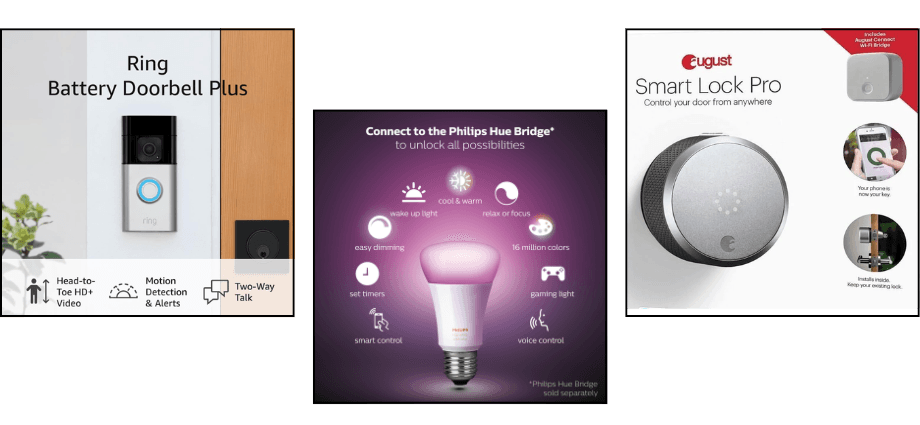
Here are three popular devices that integrate smoothly with SmartThings:
- Philips Hue Smart Bulbs: Control lighting throughout your home, create schedules, and set the perfect ambiance using the SmartThings app.
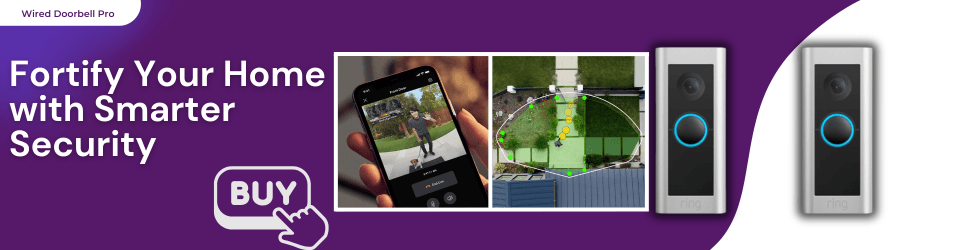
- Ring Video Doorbell Pro: Receive real-time motion alerts and interact with visitors at your door, all within the SmartThings platform.
- August Smart Lock Pro: Lock and unlock your doors remotely, grant guest access, and enhance security with ease through SmartThings.
This level of flexibility means you can add or replace devices without worrying about whether they will function with your existing setup. By offering broad compatibility, SmartThings simplifies smart home expansion for both beginners and experts.
Centralized Control
Another major benefit is centralized control, which reduces the time spent switching between numerous apps. In the SmartThings app, you can quickly lock doors, dim lights, or check cameras. Voice control options, including Amazon Alexa, Google Assistant, or Samsung’s Bixby, further streamline the process.
For instance, a single voice command at bedtime could ensure that your home’s doors are locked, lights are turned off, and the thermostat is set for overnight comfort. By making complex tasks more manageable, centralized control through SmartThings helps you maintain an organized, efficient household.
A centralized system like this underscores why Samsung SmartThings matters: it transforms complex operations into seamless interactions, removing many typical barriers to adopting smart home technology.
How Samsung SmartThings Works
Samsung SmartThings is a user-friendly system that links each of your smart home devices into a cohesive network, letting you customize how these devices interact for a more comfortable living environment.
Below, we explore two major elements: how devices connect through a central hub (or alternative methods) and how you can create routines that unify multiple actions into a single trigger.
Linking Devices through a Hub
For many users, the SmartThings Hub is the heart of the system. It communicates with devices using protocols like Zigbee, Z-Wave, or Wi-Fi. If you own a Samsung TV or certain Samsung appliances, you might already have some built-in hub features. However, a dedicated hub can often provide more stable connections, especially for non-Wi-Fi devices.
To add a new gadget, you typically open the SmartThings app, select “Add device,” and follow on-screen instructions to pair it. Once connected, the device shows up in your app, allowing you to rename it or assign it to a specific room. This organization makes device management straightforward and logical.
Routines and Automations
Routines enable you to automate daily tasks. For example, a morning routine might open your blinds, turn on the lights, and start your coffee machine at a set time. By consolidating multiple actions, routines simplify how your home responds to your schedule.
Automations can also trigger based on events, such as your phone leaving your home’s location. In that scenario, SmartThings might turn off lights, adjust the thermostat to an energy-saving setting, and lock your doors. With these features, SmartThings automates repetitive tasks, freeing you to focus on more important parts of your day.
By linking devices through a hub and using routines for smoother day-to-day operations, you can see how SmartThings unites multiple gadgets into one cohesive smart home system.
Getting Started
Samsung SmartThings is a solution that seamlessly integrates various home devices under a single umbrella, offering convenience and efficiency while helping homeowners maintain a secure, comfortable, and connected living space.
Before diving in, it is important to understand what you will need for setup and how to choose the right hardware. Below, we include a brief bullet list to guide you through the basic requirements.
Setting Up the SmartThings App

The first step involves downloading the SmartThings app on your smartphone or tablet. If you have a Samsung account, log in directly; otherwise, create a new account. The app requests certain permissions to detect and connect to new devices, which often speeds up the pairing process.
Basic setup steps include:
- Download and install the SmartThings app.
- Sign in with or create a Samsung account.
- Grant permissions for location and Bluetooth if prompted.
- Follow the prompts to set up your home environment in the app.
Once the basics are in place, you can begin adding devices by selecting “Add device.” Pick from a list of compatible brands or let the app search for nearby products in pairing mode. After a device is found, confirm the setup steps. This process generally takes only a few minutes per device.
Deciding on a Hub
Depending on which devices you plan to use, you may need a dedicated SmartThings Hub. Many modern Samsung appliances include some hub functionality, but a separate hub often provides better support for Zigbee or Z-Wave.
If you opt for a standalone hub, connect it to your router, power it up, and follow the setup instructions in the SmartThings app. Once online, you can add devices the same way you did with the app-based approach. Having a dedicated hub can also allow certain routines to run even if your internet connection is spotty, though your exact experience may vary based on firmware and device type.
By going through these steps, you will be on track to building a functional Samsung SmartThings environment tailored to your home.
Key Benefits for Your Home
Samsung SmartThings is a platform that merges convenience and innovation, letting you save energy, enhance security, and personalize how your home operates on a daily basis.
In this section, we will look at two primary advantages—energy management and home security—and include a bullet list to highlight a few practical examples of how SmartThings can improve your everyday life.
Energy Management
A notable perk of SmartThings is its ability to reduce unnecessary power usage. Smart thermostats can adjust the temperature based on your location, ensuring you do not heat or cool an empty house. Motion sensors can detect when rooms are vacant and switch off lights or devices. Over time, these small changes add up to noticeable savings on your utility bills.
You can also monitor your home’s power consumption in the SmartThings app. If you see a sudden spike in electricity use, you can investigate and adjust your routines to run more efficiently. By keeping an eye on consumption trends, you can make informed decisions that cut costs and reduce your carbon footprint.
Examples of energy-focused features include:
- Automated light switches that turn off when rooms are empty.
- Smart thermostats that set eco-friendly temperatures during your absence.
- Real-time energy usage data to identify power-hungry devices.
Improved Security
Home security is another area where Samsung SmartThings excels. Compatible smart locks can automatically lock themselves after a set duration or grant temporary access codes to visitors. Cameras linked to the platform can send real-time notifications if motion is detected, or you can receive doorbell alerts when someone arrives at your doorstep.
With SmartThings, you can also simulate occupancy when you are out of town. For example, set lights to turn on randomly in the evening, making it appear like someone is at home. These subtle steps help deter potential intruders and make you feel safer, whether you are across town or halfway around the world.
By combining energy-saving strategies and robust security features, SmartThings creates a comfortable and protected home environment that aligns with your lifestyle.
Conclusion
Samsung SmartThings is a solution that brings countless devices together, creating a cohesive, efficient, and secure home environment that many users find invaluable.
While it depends on consistent internet access and some devices might require thorough checks for compatibility, the overall ease of use and robust automation potential often outweigh these minor drawbacks. Whether you are just starting to explore home automation or already have multiple smart gadgets, Samsung SmartThings offers a unified way to enhance convenience, energy savings, and security in one comprehensive platform.
Share this content:
